---
title: Sending an email to all registered teams
description: Discover how to send emails and SMS to all registered teams. This guide covers team registration, marketing, sales updates, and payment reminders using Tournkey.
---
[Skip to content](https://help.tournkey.com/university/sending-an-email-to-a-team-0#main-content)
English
Show submenu for translations
[Support](https://help.tournkey.com/university/kb-tickets/new?hsLang=en)

- [My Tickets](https://help.tournkey.com/support)
Open main navigation
Close main navigation
- [My Tickets](https://help.tournkey.com/support)
- English
Show submenu for translations
- [Support](https://help.tournkey.com/university/kb-tickets/new)
- [Contact us](https://help.tournkey.com/knowledge/kb-tickets/new)
[Contact us](https://help.tournkey.com/knowledge/kb-tickets/new?hsLang=en)
Got a Problem? Let us help you find a solution.
- There are no suggestions because the search field is empty.
1. [Help Center](https://help.tournkey.com/university?hsLang=en)
2. [Event App](https://help.tournkey.com/university/event-app?hsLang=en)
3. [Marketing](https://help.tournkey.com/university/event-app?hsLang=en#marketing)
# Sending an email to all registered teams
## Quickly connect with team contacts to resolve payment or event issues
### **Overview**
Communicating with teams during an event is essential for ensuring smooth coordination. Tournkey provides two methods to send a message to a team within the platform.
If you'd like to send a single email follow the steps [shown here](https://help.tournkey.com/knowledge/sending-an-email-to-a-team?hsLang=en).
To send an email to all registered teams follow the steps below to send an email quickly and efficiently.
---
#### **Option 1: Sending a Message directly from the Message Center**
1. **Go to Message Center** – Navigate to the Message Center in the Tournkey dashboard.
2. **Click Compose -** This will open a new draft
3. **Select an Event** – Choose the event associated with the team you want to contact.
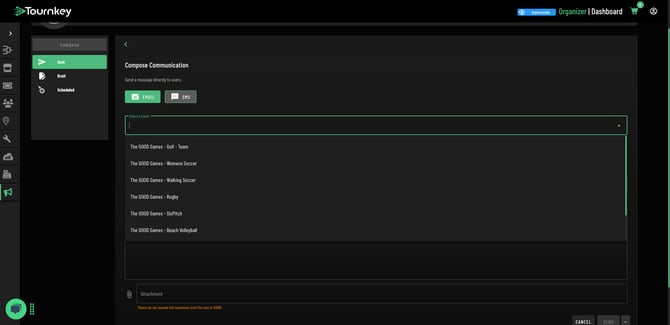
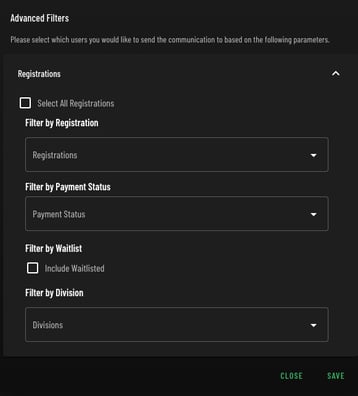
4. **Set a Filter** – Find and select the specific team you wish to message. Select All Registrations will be an unfiltered email to all teams that are active in your event.
1. **Filter by Registrations** - Enables users to select a series of participants at their discretion.
2. **Filter by Payment Status** - Enables uses to select a group of participants who have the same payment status i.e., Partial Payment, Unpaid, etc.
3. **Filter by Division -** Enables users to send emails or SMS directly to teams in specific divisions. Select as many as required.
4. **Include Waitlisted** - Check this box if you'd like to send teams who are not currently accepted into the event a message.
5. **Add Subject** – Enter a subject line for the message.
6. **Add Email Body** – Compose the message in the email body field.
7. **Add Attachment (Optional)** – If needed, attach relevant files to the email.
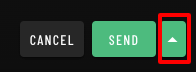
8. **Schedule or Send Email** – Choose to send the message immediately or schedule it for a later time.
---
### **Best Practices**
- Double-check the recipient team before sending the message.
- Keep subject lines clear and concise.
- Use attachments for schedules, important documents, or event-related updates.
- Utilize the scheduling option for timely communication.
For additional support, visit [**Tournkey Support**](https://help.tournkey.com/knowledge/kb-tickets/new?hsLang=en) or contact our help desk.
- [Getting Started](https://help.tournkey.com/university/getting-started?hsLang=en)
- [My Tournkey Account](https://help.tournkey.com/university/my-tournkey-account?hsLang=en#main-content)
- [Getting Started](https://help.tournkey.com/university/my-tournkey-account?hsLang=en#getting-started)
- [Waivers & Contracts](https://help.tournkey.com/university/my-tournkey-account?hsLang=en#waivers-contracts)
- [Profile](https://help.tournkey.com/university/my-tournkey-account?hsLang=en#profile)
- [Team App](https://help.tournkey.com/university/team-app?hsLang=en#main-content)
- [Payment](https://help.tournkey.com/university/team-app?hsLang=en#payment)
- [Team Details](https://help.tournkey.com/university/team-app?hsLang=en#team-details)
- [Registration](https://help.tournkey.com/university/team-app?hsLang=en#registration)
- [Hotels & Travel Support](https://help.tournkey.com/university/team-app?hsLang=en#hotels-travel-support)
- [Accommodations](https://help.tournkey.com/university/accommodations?hsLang=en#main-content)
- [Managing Your Team/Group Travel](https://help.tournkey.com/university/accommodations?hsLang=en#managing-your-team-group-travel)
- [Support](https://help.tournkey.com/university/accommodations?hsLang=en#support)
- [Collegiate](https://help.tournkey.com/university/accommodations?hsLang=en#collegiate)
- [Hoteliers](https://help.tournkey.com/university/accommodations?hsLang=en#hoteliers)
- [Payment](https://help.tournkey.com/university/accommodations?hsLang=en#payment)
- [Team Travel](https://help.tournkey.com/university/accommodations?hsLang=en#team-travel)
- [Ticketing](https://help.tournkey.com/university/ticketing?hsLang=en)
- [Organizations](https://help.tournkey.com/university/organizations?hsLang=en#main-content)
- [Account](https://help.tournkey.com/university/organizations?hsLang=en#account)
- [Point of Sale](https://help.tournkey.com/university/organizations?hsLang=en#point-of-sale)
- [Users](https://help.tournkey.com/university/organizations?hsLang=en#users)
- [Player App](https://help.tournkey.com/university/player-app?hsLang=en#main-content)
- [Teams](https://help.tournkey.com/university/player-app?hsLang=en#teams)
- [Create & Edit](https://help.tournkey.com/university/player-app?hsLang=en#create-edit)
- [Event App](https://help.tournkey.com/university/event-app?hsLang=en#main-content)
- [Payments](https://help.tournkey.com/university/event-app?hsLang=en#payments)
- [Marketing](https://help.tournkey.com/university/event-app?hsLang=en#marketing)
- [Event Setup](https://help.tournkey.com/university/event-app?hsLang=en#event-setup)
- [Registrations](https://help.tournkey.com/university/event-app?hsLang=en#registrations)
- [Travel](https://help.tournkey.com/university/event-app?hsLang=en#travel)
- [Events](https://help.tournkey.com/university/event-app?hsLang=en#events)
- [Facility Management](https://help.tournkey.com/university/event-app?hsLang=en#facility-management)
- [Marketing](https://help.tournkey.com/university/marketing?hsLang=en)
- [Volunteering](https://help.tournkey.com/university/volunteering?hsLang=en)
- [Event Tourism](https://help.tournkey.com/university/event-tourism?hsLang=en)
- [Tips & Videos](https://help.tournkey.com/university/tips-videos?hsLang=en)
[](http://www.tournkey.app)
[mailto:email@email.com](mailto:email@email.com)
Copyright © 2026, Tournkey Tournament Systems Inc.
[Knowledge Base Home](https://help.tournkey.com/knowledge?hsLang=en) [Support](https://help.tournkey.com/knowledge/kb-tickets/new?hsLang=en) [Book a Demo](https://tournkey.com/demo/) [Blog](https://blog.tournkey.com/?hsLang=en)
© Tournkey. All rights reserved.